Using Out-of-Network Resources in FormFusion
Printers and Email Servers
Out-of-network printers and email servers are configured by selecting them from the appropriate dropdown menus. This process is similar to configuration of a MAPS printer or email server.
Printers can be specified: at the environment level (within Environment Configuration), in a PrintDirector override, in a Test Print template override, or passed in an evilp call. Email servers can be specified in EmailDirector.
ScriptDirector
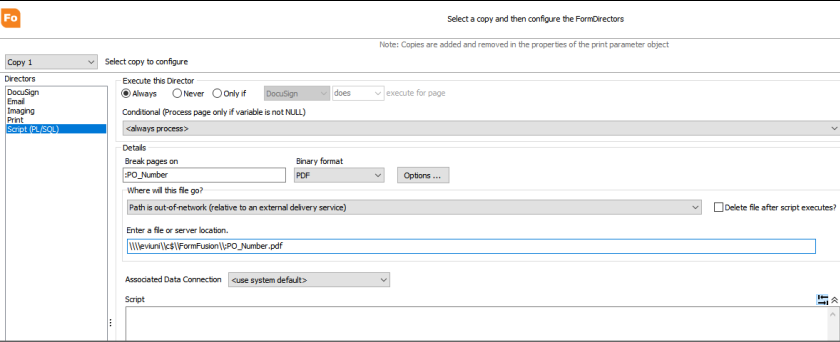
Under the Where will this file go? section, select the Path is out-of-network (relative to an external delivery service) option if the MAPS server does not have access to the specified path. The Evisions Delivery App server should have access to this path so it can copy the output to that directory. Note: the directory path must exist in order to copy the output to that location.
ImagingDirector
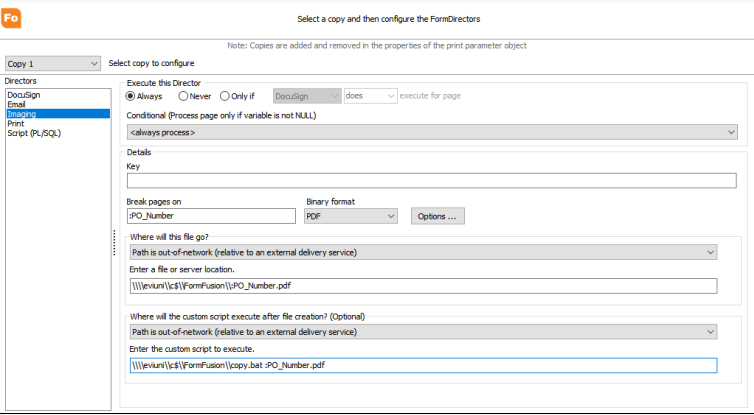
Under the Where will this file go? section, select the Path is out-of-network (relative to an external delivery service) option if the MAPS server does not have access to the specified path. The Evisions Delivery App server should have access to this path so it can copy the output to that directory. Note: the directory path must exist in order to copy the output to that location.
Under the Where will the custom script execute after file creation? section, select Path is out-of-network (relative to an external delivery service) if the script should run in the Evisions Delivery App server. This script can be any valid system command.